
I’ve got over 40 WordPress sites. Whilst I love what WordPress did for the web, the last few years have been a slow grind of plugin upgrades, security patches and the occasional 3am email telling me another one got popped anyway. Automated updates, hardened configs, the lot - and still, every couple of years one of them would get hacked. Given 90% of my content is genuinely static, I finally got fed up and started moving everything off. The WooCommerce stuff went to Shopify so I never have to think about it again. The blogs and content sites are going to Hugo, Astro, or in a couple of cases my own Laravel platform.
rus.io was the first to move.
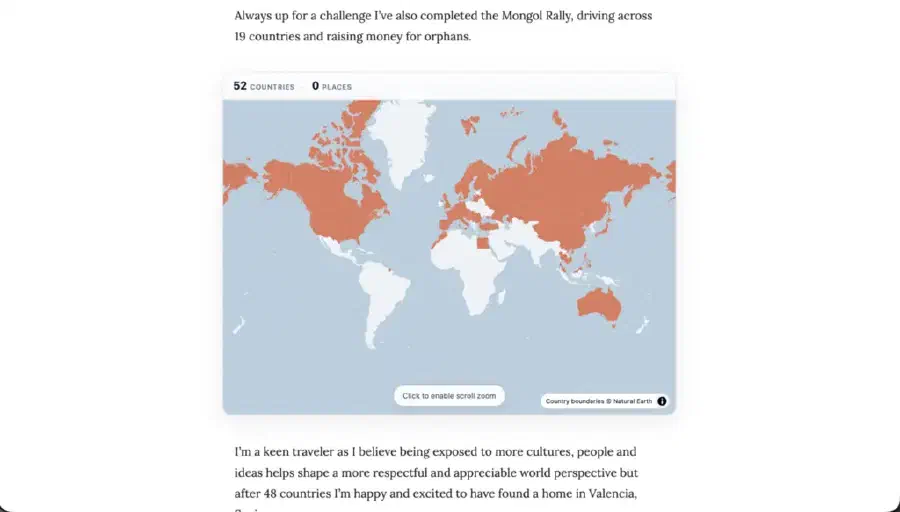
The migration was pretty painless apart from one thing. I had an interactive travel map on my About page, built with the interactive-geo-maps WordPress plugin, and I really didn’t want to lose it. I’ve travelled to 52 countries so far, I link blog posts back to the countries and cities I’ve been to, and that map is one of my favourite bits of the site. So I went looking for a Hugo equivalent.
Nothing. Not a single one. I checked themes, modules, shortcodes, gists, dusty github repos.. genuinely nothing.
So I built one!
hugo-travel-map
It’s a Hugo module - github.com/rushughes/hugo-travel-map. Drop it in to your hugo.toml, add a data/visited.yaml listing the ISO-3 codes for the countries you’ve been to, optionally tag your posts with a locations: list in their front matter, and you get an interactive world map shading the countries you’ve visited, with little markers for cities and clickable popups linking back to the posts you wrote there.
I built it as a module rather than a theme component on purpose. Coming from the WordPress plugin world it felt obvious - anyone running any Hugo theme should be able to drop this in without forking it. I’m not 100% sure that was the right call but it’s the call I made!
The thing I’m most proud of is the speed. By default the map draws water and country polygons only and makes zero external tile requests. No Google Maps, no Mapbox key, no third party watching your visitors load your About page. It’s literally a static GeoJSON file and a chunk of MapLibre, served from your own site. If you want a proper basemap you can wire up Protomaps PMTiles, self-hosted on R2 or via the hosted API, and the module registers the protocol for you. But the default is fast, private and zero-config!
You can see it live on my About page. 52 countries shaded in, the rest waiting.
52 Down, 48 To Go
The point of putting the map on my About page wasn’t to brag - it was to give myself a visible scoreboard. I want to hit 100 countries and see the wonders of the world before I’m too creaky to enjoy them.
Next up is South America. I want to do Machu Picchu and the Mayan temples in the Yucatan properly - not a 3-day stopover with the coach tour and a souvenir t-shirt, the slow version, with the hikes, the local food, and the bit where I get sunburnt because I forgot the sunscreen. After that, Antarctica, and if I can swing it the Falklands on the way back to see the penguins. The kind of trip you plan for years and talk about for the rest of your life!
Every country I add to that map is one tick closer.
Use It!
If you’re running a Hugo site and you’ve ever wanted a travel map - or if you’re a fellow WordPress refugee looking for one less reason to stay - go grab it. MIT licensed, no API keys required, full docs in the README. PRs and issues welcome.
Have you migrated off WordPress yet? What broke that I should know about?