We’re using an old version of Upstart, on Centos, to manage stopping and starting our Node.js daemons, and one of the things the script does, like any good deamon, is change the user of the deamon process from root to something more applicable, security and all that 😉
The scripts look a little like this
!upstart
description "Amazing Node.js Daemon"
author "idimmu"
start on runlevel [2345]
stop on shutdown
env PATH=/usr/local/sbin:/usr/local/bin:/sbin:/bin:/usr/sbin:/usr/bin
env NAME="amazing-daemon"
script
export HOME="/root"
cd /opt/idimmu/$NAME
echo $$ > /var/run/$NAME.pid
exec sudo -u idimmu /usr/bin/node /opt/idimmu/$NAME/server.js >> /var/log/$NAME/stdout.log 2>&1
end script
pre-start script
echo "[`date -u +%Y-%m-%dT%T.%3NZ`] (upstart) Starting $NAME" >> /var/log/$NAME/stdout.log
end script
pre-stop script
rm /var/run/$NAME.pid
echo "[`date -u +%Y-%m-%dT%T.%3NZ`] (upstart) Stopping $NAME" >> /var/log/$NAME/stdout.log
end script
Which is nice, as it means we can use Upstart to stop/start/status deamons really nicely. The equivalent init.d script looked really horrible.
Read more →


 It’s rare that I’m genuinely in shock and awe of something, but that’s how I felt last night in The Albert, down under Brighton train station!


 Earlier today I was setting up a brand new server for a migration and just as I was typing scp .ssh/authorized_keys2 my brain went and asked a question..
 I gave up drinking 3 months ago, but still have a fridge full of beer which I didn’t want to pour down the sink, so I decided to make something with it. I found
 Back in September Google released it’s new
 There are several things to think about when taking control of another computer, the Operating System running on it, the speed of your network connection and the tools you have at your disposal.
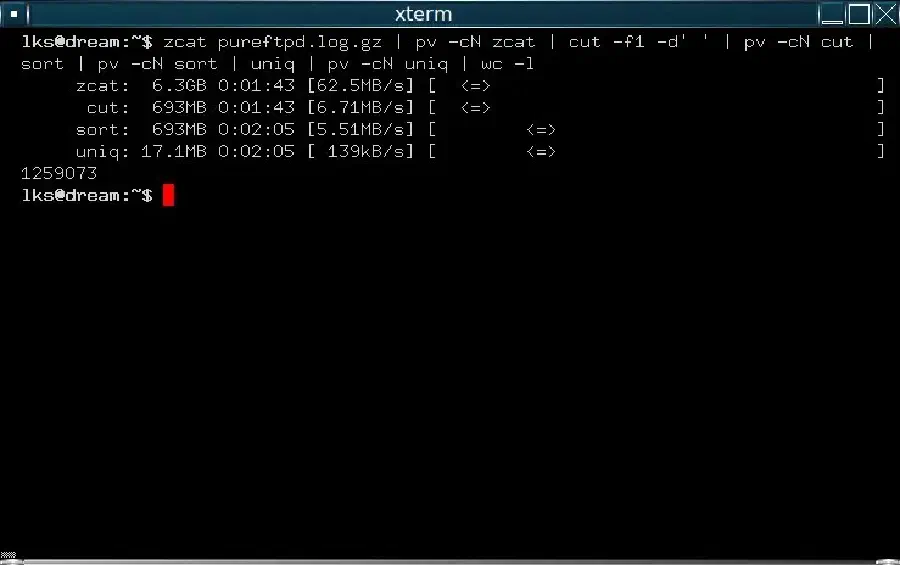
 I’ve got a rather large dataset that I need to do a lot of processing on, over several iterations, it’s a 20gb zip file, flat text, and I’m impatient and don’t like not knowing things!