
Python support for SSL and HTTPS is not installed
I wanted to give Google’s new Go language a try which requires checking out the source code with Mercurial.
Mercurial was installed from ports on my Mac with
<br /> sudo port install mecurial<br />
But checking out the code threw an error.
<br /> Chill:~ rus$ hg clone -r release https://go.googlecode.com/hg/ $GOROOT<br /> abort: Python support for SSL and HTTPS is not installed<br /> Exception exceptions.AttributeError: "'httpsrepository' object has no attribute 'urlopener'" in > ignored<br />
Error: Could not open command file ‘/var/log/nagios/rw/nagios.cmd’ for update! on RedHat
I’m currently setting up some new clusters under RedHat and each cluster is getting it’s own Nagios instance, trying to use the web based management interface however threw and error.
I’ve seen this error before on Ubuntu and was getting it again under RedHat. Of course I revisited my Ubuntu solution and realised that it didn’t help at all, due to using dpkg overrides, also the situation was very different!
<br /> root@nagios:/var/log/nagios/rw# ls -al<br /> total 8<br /> drwxrwxr-x 2 nagios apache 4096 Oct 30 13:37 .<br /> drwxrwxr-x 5 nagios apache 4096 Oct 30 13:40 ..<br />
Creating A Local and HTTP RedHat Yum Repository
We’re rolling out a RedHat platform for a major product delivery to a client in the next couple of weeks, which is a great chance for me to build a fresh platform using all the skills I’ve acquired and actually do things properly (TM).
We’re using RedHat Enterprise Linux 5 because this is a very critical deployment and we want an Operating System that is certified to both our hardware and software applications, something that unfortunately Ubuntu does not deliver.
Bash Shortcuts
Meta-< -> go to beginning of history file
Meta-> -> go to end of history file
Meta-f -> go to next word in command line
Meta-b -> go to previous word in command line
Meta-d -> delete next word in command line (from the actual position of the prompt)
Ctrl-a -> go to the start of command line
Ctrl-e -> go to the end of command line
Ctrl-p -> previous command in history
Ctrl-n -> next command in history
Ctrl-f -> next character in command line
Ctrl-b -> previous character in command line
Ctrl-r -> reverse search in history file
Ctrl-d -> delete current character
Ctrl-k -> delete from the prompt to the end of command line
Ctrl-_ -> undo (yes, but limited)
Burning an XVid to DVD in Ubuntu Jaunty from the command line
I needed to burn an XVid of one of my performances to DVD last night, remotely, as my MythBuntu box was being used by someone else to watch some crappy TV and I wanted to show off! It was a pretty simple process, just involving a bit of a wait during the transcode 🙂
First you will need to make install the relevent packages:
sudo aptitude install dvdauthor ffmpeg ~nlibav.+-unstripped.+
If you already have dvdauthor and ffmpeg installed, you must install the unstripped libav packages as they contain a tool called mpeg2video and it’s this that does the heavy grunt work!
google-apis-mavenized does not compile
I need to write some backup software for our hosted Google Apps, so as we’re a Java shop I’m going to be using the Java API. Also we’re heavy users of Hudson and Maven so want to get the checked out source building with that.
There is a Google Code project called google-apis-mavenized which looks like it has done most of the work for us, but it does not build when it’s checked out.
New Ubuntu Jaunty Screen
At the moment I’m trying out the beta for Ubuntu Jaunty and one the first thing I noticed was the new version of screen available!
Initially you are provided with a menu to choose a theme!
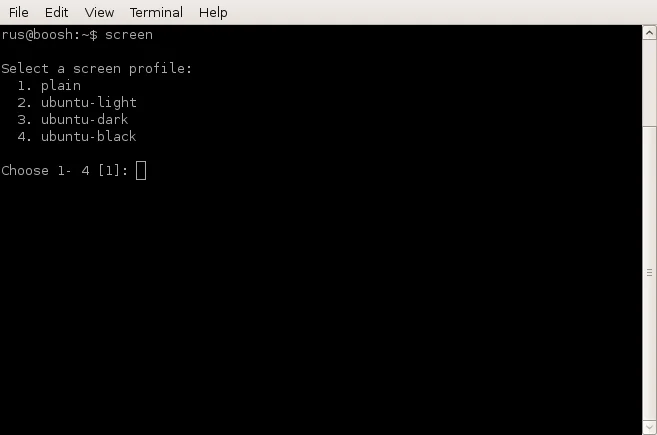
I went with option 3, Ubuntu Dark! You’re then presented with an interesting new screen display, with 2 rows of status at the bottom, in lots of colours, displaying information about the CPU and RAM etc!
Changing variables in a BASH while loop
There is an error that I often run in to when working with files and while loops in BASH. Often I have scripts similar to the following, where I cat a file and read it in using a while loop to process variables in the file:
#!/bin/bash
count=0;
cat testfile | while read line
do
    count=$(($count+1));
    echo $count;
done
echo "Total $count";
and using the following test data in testfile as: