
It’s Friday afternoon, 14:16, and I’ve just pushed a stupid amount of new stuff live on tools.rus.io.
Back in April I launched the site with a handful of calculators and a markdown-to-PDF tool. Percentage maths, bill splits, JSON prettifying - the boring stuff I kept re-googling on pages covered in ads. Fine. Useful. Not exactly exciting!
This week is different!
Thirteen new pages. Browser Whisper transcription for WhatsApp voice notes. A whole audiophile verification cluster for CD rips. EXIF stripping. An X media downloader. Even a favicon generator I originally built because the site needed one.
Every single tool exists because I had a problem last week, not because I was chasing some product roadmap. That’s the entire point of the site - scratch my own itch, ship it, move on.
I’ve been building software for real businesses for 15+ years and the pattern is always the same: stop answering the same question by hand, automate the boring check, turn a chunk of data in to something you can actually send someone. tools.rus.io is where I put the small-stuff version of that habit, except now the browser is doing work that used to need installed apps and GPU servers.
Let me walk you through what landed and why I think some of this is genuinely insane from a technical standpoint.
Browser Whisper Transcription For WhatsApp Voice Notes
The only thing I hate more than WhatsApp voice notes is the people who send them to me.
I’m usually in meetings, talking to people or listening to music. Sending me a voicenote at best pulles me out of what I’m doing and forces me to focus on your message. At worst the message gets ‘read’ and then drops off my phone because I can’t listen to it, only for it to be forgotten and you to be angry. It’s lazy and makes me do the work so you don’t have to. Not to mention if it’s actually important with details that need to be noted, that might mean multiple listens to make sure I get the detail correct. Fuck you.
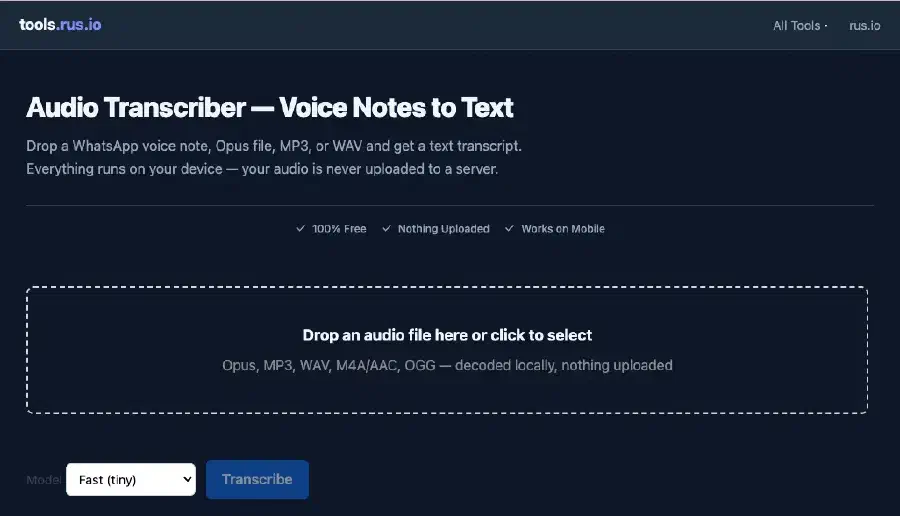
So I built the WhatsApp Audio Transcriber (which works for any audio file really)…
Drop an Opus file, an MP3, a WAV, M4A, OGG - whatever - it decodes locally in your browser for privacy, runs speech-to-text, and gives you a plain transcript you can copy. WhatsApp voice notes, meeting recordings, random audio clips people forward you. Done! No ffmpeg install, no CLI, no “upload to our cloud and trust us” nonsense.
And here’s something cool that actuially blows my mind: this runs a small LLM entirely in your browser!
I’m using @huggingface/transformers with the Xenova Whisper models - whisper-tiny.en by default, whisper-base.en if you want more accuracy. Quantised ONNX weights, about 40 MB for tiny and 75 MB for base. They download once from my CDN, get cached, and then inference happens via ONNX Runtime in WebAssembly. On your machine. Not on my server. Not on OpenAI’s API. Not anywhere you didn’t explicitly choose.
The audio decode path is shared with the spectrogram tool - decodeAudio() pulls PCM out of whatever container you threw at it, mixes down to mono, resamples to 16 kHz, splits anything longer than 30 seconds in to chunks, and feeds each chunk through the ASR pipeline. Long voice notes just work.
I genuinely cannot get over how mad this is. Five years ago you’d need a GPU and a Python environment and half an hour of faffing with CUDA drivers to run Whisper on a desktop. Now I’m doing it in Chrome on my phone whilst waiting for coffee. A small language model doing speech-to-text locally, with nothing uploaded, on a static website I built in my spare time.
That’s INSANE! I love it!
The first time you transcribe a file there’s a one-off model download - tiny is about 40 MB, base is about 75 MB - and then it’s cached. After that, a 60-second voice note on desktop finishes in a reasonable time because long audio gets split in to 30-second chunks automatically. Mobile defaults to the fast model because obviously you’re not waiting around on 4G for the big one unless you really want to.
Verify EAC Rip Logs In The Browser
If you’ve been following my recent MiniDisc rabbit hole, and if not, go read that post first, you’ll know I’ve been ripping my own CDs to FLAC again, prepping albums for recording on to MiniDiscs with foobar2000 and Web MiniDisc.
The workflow is deliberate. Physical discs, optical input, track marks from silence gaps. Constraints are the point! I ported foo_dsp_silence to macOS so I could insert silence between tracks before burning because MiniDisc recorders need gaps to auto-split, and gapless digital libraries don’t give you that for free.
But before any of that happens, you rip the CD properly. Exact Audio Copy on Windows, X Lossless Decoder on macOS, both produce a log file with an embedded checksum proving the log hasn’t been tampered with. If you’re archiving your own collection, or buying hi-res downloads and wanting to verify what you actually got, that checksum matters. I’ve got shelves of CDs I’ve owned since the 90s and I’m not re-buying them on streaming, unlike Sony digital movies the CDs are mine and I want rips I can trust.
The Log Checksum Checker verifies those signatures locally. Drop an EAC or XLD log, paste the text, whatever, it auto-detects the ripper, strips the checksum block, recomputes the signature, and tells you valid, invalid, or unsigned.
EAC uses Rijndael-256 CBC with a fixed key and zero IV, weird but documented. XLD has its own custom SHA-256 variant with a scrambled base64 alphabet. Both run synchronously in the browser after a UTF-16-LE BOM sniff for those classic Windows EAC logs.
No upload. No desktop install. Just drag and drop. Pretty awesome for something that used to mean installing a random Windows utility from a forum thread last updated in 2011! Previously I was running terminal commands I’d kept in a text file, now I drag and drop.
FLAC Integrity Checker With libflac WASM
Once you’ve got FLAC files, you want to know they’re actually intact. The STREAMINFO block in every FLAC file stores an MD5 of the decoded audio - if that doesn’t match when you decode the file, something’s corrupted or been modified.
The FLAC Integrity Verifier checks that via libflac compiled to WebAssembly. Real libflac, running in your tab, verifying MD5 checksums against decoded PCM. It also flags ID3 tags bolted on to FLAC files (some rips have this and it breaks strict verification), runs a secondary browser decode check when ID3 pollution is detected, and audits Unicode filename normalisation - NFC vs NFD mismatches that can bite you when moving albums between macOS and Linux.
Batch mode scans a whole folder, concurrency-limited so your browser doesn’t melt, and exports CSV.
WebAssembly for audio codec verification in a browser tab. Wild! I keep saying that but I mean it - five years ago this was desktop-only territory and now I’m shipping libflac in a Vite chunk that only loads when you open this specific tool.
The batch CSV export is the bit I actually use. Point it at an album folder, let it chew through the .flac files with concurrency capped at 2-3 so Chrome doesn’t sulk, download the report. If you’re moving rips between machines or prepping a MiniDisc recording session and you want confidence the files haven’t picked up corruption somewhere along the way, that’s the workflow.
CUE Sheet Validator For CD Rip Folders
CD rips often ship with a .cue file defining track boundaries - INDEX times, FILE references, the lot. Bad INDEX ordering, wrong encoding, or EAC’s non-compliant per-track FILE layout will break burning, splitting, and anything else that trusts the cue sheet.
The CUE Sheet Validator & Fixer parses your cue locally, lists issues with line numbers, shows a track timeline, optionally cross-checks against an attached album folder, and can export a fixed UTF-8 cue with a changelog before you download.
I built this because my own rips kept failing the sanity check at the cue stage and I was tired of eyeballing INDEX lines in a text editor. UTF-16 cue files from old Windows rips get detected automatically, the fixer only applies unambiguous repairs, and you see the changelog before you commit to the download. Idiot-proofing for future me!
Spectrogram Analyzer Online for Spotting Transcodes By Eye
Sometimes MD5 checksums and log signatures aren’t enough. You want to see whether a “lossless” file is actually lossless, or whether someone re-encoded a 128 kbps MP3 in to a FLAC container and called it a day.
The Spectrogram Analyzer & Transcode Detector renders a heatmap spectrogram at the file’s native sample rate - no resampling before analysis, so the Nyquist ceiling is truthful - and applies shelf-based cutoff detection to estimate where the frequency content actually stops. A genuine CD rip shows energy up around 20-22 kHz. A lossy transcode hits a brick wall around 16 kHz.
It uses a self-vendored radix-2 FFT, STFT analysis, heuristics for fake 24-bit padding, batch folder scanning with CSV and M3U export, interactive zoom on suspicious regions, and hi-def PNG export if you want proof for a forum post or your own notes.
Spek is dead. Fakin’ The Funk is paid and desktop-only. I wanted something free that runs in a tab and doesn’t upload my library!
Batch mode is where it gets serious. Folder picker, sortable table, inline spectrogram previews, summary counts, CSV and M3U export, hi-def PNG export per file if you want archive-quality screenshots. On Chromium you can even move suspect files to a /_suspect folder or type DELETE to clean up - handy when you’re going through a rips folder and want to quarantine stuff that fails the eye test.
Evidence, not proof - the tool shows you the spectrogram and a confidence tier rather than stamping FAKE on everything. Gradual rolloffs get marked inconclusive rather than wrong. Reasonable! I’m not trying to start fights on forums, I’m trying to give you the data to make your own call.
MP3 Encoder Detector - EncSpot For 2026
If you’re dealing with MP3s specifically - maybe you’ve got a folder of encodes from different eras, or you want to know whether something was done with LAME V0 vs an ancient Xing encoder - header inspection tells you a lot without decoding a single audio frame.
The MP3 Encoder Detector parses the first valid MPEG Layer III frame plus Xing/Info/LAME tags. Encoder string, VBR method, preset nibble (V0, V2, 320 CBR, etc.), lowpass filter frequency, channel mode. Header-only - reads up to 8 KB per file, skips ID3v2 via synchsafe size, scans for the first valid frame. Fast enough to batch thousands of files.
It also flags transcode heuristics - stated bitrates that don’t match the lowpass you’d expect from a genuine encode at that rate. Pair it with the spectrogram tool if you want visual confirmation.
EncSpot hasn’t been maintained in years. This is the replacement I wanted on my Mac!
Fake Hi-Res FLAC Checker
Streaming services and download stores love selling “hi-res” FLAC at 96 kHz / 24-bit that’s often just a 44.1 kHz CD master upsampled with zero new information above 22 kHz. Or worse - 16-bit samples with the low byte zero-padded to fake 24-bit depth.
The Fake Hi-Res Detector is a dedicated landing page reusing the spectrogram engine but focused on those queries. Single-file report with three checks: sample rate, content ceiling vs 22 kHz, true bit depth. Hi-res batch mode flags upsampled files and padded 24-bit encodes, exports CSV and flagged M3U playlists.
Search terms like “fake 24 bit flac checker” and “is my hi-res real” have real intent and near-zero competition for a free browser tool. I built the page because I kept buying albums in hi-res and wanting to know if I’d actually got anything more than the CD master.
The spectrogram viewer on that page is interactive - drag to zoom suspicious regions, see the brick wall at 22 kHz when someone’s upsampled a CD master to 96 kHz without adding any actual content above the Nyquist limit of the source. Fake 24-bit padding shows up when decoded samples align to 16-bit quantisation steps even though the file header claims 24-bit. Both checks reuse the same analyse engine as the main spectrogram tool, just with copy and UX tuned for people searching specifically for hi-res scams rather than general transcode detection.
The Audio Tools Hub
All of the above interlink. Log checksum first, then FLAC integrity, then cue validation, then spectrogram and encoder checks, then hi-res verification if you’re suspicious of a purchase.
I pulled them together on the Audio Tools Hub - a static landing page describing the workflow, linking every tool in the cluster, with prose on how they fit together. Google rewards topical authority and I’d rather send people through one hub than leave seven isolated widget pages floating around!
If you’re archiving your own CDs, verifying a hi-res purchase, or prepping FLAC for a MiniDisc recording session like mine, start there!
Inspect Linux ISO Torrents Without Uploading
Quick detour from the audio stuff.
Sometimes you download a .torrent file for a Linux ISO - Ubuntu, Debian, Fedora, whatever - and you want to inspect the info hash, check whether it’s a v1 or v2 or hybrid torrent, see the announce URLs, verify the file list, check the private flag, copy a magnet link. Without uploading the torrent to some random website you’ve never heard of.
The .torrent Inspector parses bencode locally. v1 SHA-1 info hashes, v2 SHA-256 where applicable, scrollable file table, copy buttons for hash and magnet. Nothing leaves your browser!
I use this when I’m sanity-checking ISO torrents before I seed them. Ubuntu desktop ISO, Debian netinst, whatever - drop the .torrent, read the file tree, copy the magnet, confirm it’s not marked private when you expected public. That’s it. That’s the use case.
The info hashes are computed from the raw bencoded info dict bytes with no re-encode roundtrip, which matters when you want the hash to match what your client will actually use. v1 gives you SHA-1, v2 and hybrid torrents show SHA-256 where applicable. Corrupt files get a clear error instead of a silent crash.
EXIF Stripper Browser - Real ExifTool In WASM
Photos embed a lot more metadata than most people realise. GPS coordinates, camera serial numbers, timestamps, lens info, sometimes the owner’s name in XMP tags. Fine when you’re organising your library. Less fine when you’re posting a holiday snap to social media and accidentally broadcasting where you live.
The EXIF Viewer & Stripper runs ExifTool 13.42 compiled to WebAssembly via @uswriting/exiftool. View grouped metadata, see GPS callouts, toggle raw JSON, export to JSON/CSV/PDF, strip everything with -all= and download the cleaned file. Batch mode zips stripped outputs.
Default path is 100% local WASM. There’s an optional URL fetch via a stateless Cloudflare Pages Function if you want to pull a public image by URL - the bytes pass through, nothing gets logged or stored - but drop a file on the page and it never touches my infrastructure at all.
Upload-based EXIF tools have always weirded me out. You’re sending your holiday photos to someone else’s server to remove the GPS tag? No thanks!
There’s also a free REST API at /api/exif/extract and /api/exif/remove if you’re a developer who wants synchronous extract/strip without building your own ExifTool WASM integration - rate limited, no API keys, no UUID polling nonsense. The web UI doesn’t need it; it’s there for scripts and integrations.
X Media Downloader For Public Posts
Sometimes you see a public post on X with a video clip, an animated GIF, or a screenshot-worthy thread and you want to save it for offline reference. Not repost it, not scrape private accounts - just grab the media from a public tweet you already have the URL for.
The X Media Downloader resolves public tweet URLs via stateless Pages Functions, lists all MP4 quality variants, downloads images and GIFs, extracts MP3 via ffmpeg.wasm in the browser (server doesn’t transcode), renders a styled tweet card screenshot to PNG, and supports bulk mode for up to 20 URLs with ZIP export.
URLs aren’t logged. Media downloads prefer direct CDN links. Proxy only when CORS or HLS requires it. Shareable ?url= query param so you can bookmark a post you’ve already resolved. Smart filenames like {screen_name}_{tweet_id}_{WxH}.mp4 instead of video.mp4 like every other downloader gives you.
The screenshot export renders a styled tweet card in the DOM and dumps it to PNG - useful when you want a visual reference rather than just the raw media file. Bulk mode handles up to 20 URLs and zips everything. Public posts only; private accounts get a clear error rather than some creepy login scraping attempt.
Favicon Generator I Built For The Site
Meta admission: the Favicon Generator exists because tools.rus.io needed a proper favicon bundle and I didn’t want to use a watermark SaaS tool!
Image upload, text/emoji mode, user-editable manifest fields, dark-mode SVG variant, preview grid, download a superset ZIP with ICO multi-frame, PNG sizes, Apple touch icon, maskable icon, manifest.webmanifest, HTML snippets, README. Built with fflate and ico-codec, entirely client-side.
I dogfooded it for the site, then shipped it for everyone else because once you’ve got the pipeline working there’s no reason to gate it. Master canvas at 512×512, derive ICO with 16/32/48 frames, PNG sizes including maskable with the 409 safe zone, Apple touch at 180, dark-mode SVG with prefers-color-scheme, HTML snippets you can paste straight in to your <head>. The Evil Martians 2026 superset plus favicon.io naming aliases so you’re not renaming files manually afterwards.
Why Everything Runs In The Browser
There’s a load-bearing rule across almost every tool on the site: your files never get uploaded.
Calculators and formatters were obvious - nothing to upload. The audio cluster, the EXIF tool, the transcriber, the favicon generator - all client-side. WASM where native code is needed: libflac for FLAC verification, ExifTool/zeroperl for metadata, ffmpeg.wasm for X MP3 extraction, ONNX Runtime for Whisper inference.
Vite lazy-loads each heavy chunk so opening the percentage calculator doesn’t download 40 MB of Whisper weights. Fair!
Two scoped backend exceptions exist and I’m upfront about them. EXIF has optional URL fetch. X Media Downloader has resolve/proxy Functions for tweet metadata and CDN edge cases. Both are stateless, rate-limited, no logging, no accounts. The default path for both tools is still local-first where possible.
I spent years building SaaS platforms where everything went through a server because that’s where the billing hook lived. tools.rus.io is the opposite bet - static hosting, client-side compute, privacy as the default rather than a premium tier.
The heavy stuff is isolated per tool in the Vite build. Open the JSON formatter and you don’t pull libflac. Open the transcriber and you don’t pull ExifTool. Open the percentage calculator and you pull basically nothing. Each WASM blob or ONNX model loads lazily on first use of that specific page. First visit to the audio transcriber costs you a model download; every other calculator page stays lightweight.
Cloudflare Pages hosts the static assets. Functions only fire on /api/* routes so the free static quota doesn’t get eaten by asset requests. _routes.json keeps that boundary clean.
What’s Live Now
If you just want links, here’s everything from this release batch:
- Audio Transcriber - WhatsApp voice notes and audio files to text via browser Whisper. Nothing uploaded.
- Spectrogram Analyzer & Transcode Detector - Free online spectrogram with transcode and fake-lossless heuristics. Batch folder scan.
- EAC & XLD Log Checksum Checker - Verify CD rip log signatures locally.
- MP3 Encoder Detector - LAME/Xing header inspection, EncSpot-style preset and VBR reporting.
- FLAC Integrity Verifier - STREAMINFO MD5 verify via libflac WASM, ID3 pollution warnings, Unicode filename audit.
- CUE Sheet Validator & Fixer - Parse, validate, and fix CD rip cue sheets with optional folder cross-check.
- Fake Hi-Res Detector - Spot upsampled hi-res and fake 24-bit padding in FLAC files.
- .torrent Inspector - Parse torrent files locally, info hashes, magnet links, file tree.
- Audio Tools Hub - Landing page linking the whole rip verification workflow.
- EXIF Viewer & Stripper - View and remove GPS, EXIF, XMP, IPTC metadata with ExifTool WASM.
- X Media Downloader - Download videos, images, and GIFs from public X posts.
- Favicon Generator - Complete favicon bundle from image, text, or emoji. ICO, PNG, SVG, manifest.
Plus everything from the April launch still running, calculators, JSON formatter, markdown to PDF, password generator, the rest.
I’m pretty excited about whats possible in the browser now. I remember reading about applications in tbe browser back in the 90s thinking it was retarded. How wrong was I. Small LLMs doing transcription, native audio codecs in WASM, real ExifTool parsing metadata locally, stuff that needed a desktop app and an install wizard not that long ago.
If you’re ripping CDs, start at the Audio Tools Hub. If someone sent you a voice note you can’t listen to, hit the Audio Transcriber. If you’re about to post holiday photos, strip the EXIF first. All free, no account, no paywall!